

Clients kept asking about WhatsApp bots, so I built one

Gerry White • October 18, 2026

Short version: you can run a WhatsApp FAQ bot for a small business for free, using the WhatsApp Cloud API and a Cloudflare Worker. The code took an afternoon. Getting Meta, WhatsApp and my own phone number to agree with each other took most of an evening, a privacy policy I didn't have, and a lot of muttering.

Over the last few months I've had several conversations with clients about WhatsApp bots. Could customers ask product questions on WhatsApp? Could a bot handle the repetitive "do you deliver to..." and "how much is..." questions? I always said yes, it's doable. But if I'm honest, I wasn't sure how much work it would actually be, what it would cost, or where the gotchas were.

So rather than guess, I built one for Dergal. One Sunday, one phone number, as few paid tools as possible. It works now, and the most useful thing I can share isn't the code, it's every wrong turn I took on the way.

I am not going to lie, I had a lot of help from Claude.

What I built


  • A menu: say "hi" and you get a tappable list of  topics, each with a short answer and a link to the relevant page on this site.
  • Keyword matching: type "do you do migrations?" and you get the migrations answer. No AI model, just simple keyword scoring.
  • A human handover: if the bot can't answer, it gives you a tap-to-chat link to message me directly.
  • A content ideas log: unanswered questions are stored for 30 days so I can see what people actually ask. As an SEO, that last bit is the real prize. Real questions from real people are the best briefs for FAQ and guide content.


This is pretty basic for now, but I am optimistic I can improve on it

How it works: the idiot's guide

If you've never looked at how a WhatsApp bot works, it's simpler than it sounds. Think of it as three characters:


  • WhatsApp (Meta) is the front end -  It sends messages between phones, including to and from my business number.
  • The bot is a a basic, if then that. It reads each message, looks up the right answer, and sends a reply back
  • Reporting: how many replies this month, which messages it has already dealt with, and which questions it couldn't answer.

Here's what happens when you send "hi" to Dergal on WhatsApp, which all takes about a second:


  1. You send the message. It goes to Meta's servers like any other WhatsApp message.
  2. Meta taps the bot on the shoulder. Because my number is on the WhatsApp Cloud API, Meta doesn't deliver it to a phone. Instead it sends the message to a web address I gave it, called a webhook.
  3. The bot checks it's really from Meta. Every message comes with a signature made using a secret only Meta and I know. If the signature doesn't match, the bot ignores it, so nobody can spoof messages to it.
  4. The bot checks its 'notepad'. Has it already seen this exact message (Meta sometimes sends things twice)? Is it under its monthly and per-person limits?
  5. The bot picks a reply. "Hi" gets the menu. Tapping a menu item gets that answer. A typed question gets matched on keywords. Anything else gets the "message Gerry directly" link.
  6. The bot asks Meta to send the reply. It calls Meta's API with an access token that proves it's allowed to send from my number.
  7. Meta delivers the reply to your phone. Job done.

That's genuinely it. No AI model, no database server, no app to install. 

Where Cloudflare fits in

The "receptionist" needs to live somewhere on the internet, always on, with a web address Meta can reach. I didn't want to run a server for a side project, so I used Cloudflare Workers .

A Worker is a small piece of JavaScript that runs on Cloudflare's network. You don't manage a server; it simply wakes up when a request arrives, runs, and goes back to sleep. Cloudflare's free plan allows 100,000 requests a day, which is wildly more than a consultancy FAQ bot will ever need. Here's how the bot uses Cloudflare:


  • Cloudflare Workers runs the bot itself. One Worker, a few hundred lines of JavaScript, with a free workers.dev address that I gave Meta as the webhook URL.
  • Workers KV is the notepad. KV is Cloudflare's simple key-value storage. The bot uses it for the monthly reply counter, the per-person daily counter, the "already seen this message" list, and the unanswered questions log. Every entry has an expiry date, so it tidies up after itself.
  • Secrets hold the keys. The WhatsApp access token, Meta's app secret and the phone number ID are stored as encrypted secrets on the Worker, not written in the code. If I ever share the code, I'm not sharing the keys.
  • Observability logs for debugging . Cloudflare's built-in logs showed every request the bot received and every error Meta sent back. When things weren't working, the logs told me whether Meta was reaching the bot at all, or whether the bot was reaching Meta and being refused.

The nice side effect: there's nothing to patch or keep running. If the bot gets no messages for a month, it costs nothing and does nothing.

Keeping it free: the 1,000 message rule

Meta changed WhatsApp pricing on 1 October 2026. Replies a business sends within the 24-hour customer service window used to be free; now they are charged per message, but each phone number gets 1,000 free service messages a month. Messages customers send to you are always free.

For a consultancy FAQ bot, 1,000 is plenty, but I didn't want a surprise bill if something went wrong. So the bot has guard rails:

  • Exactly one reply per incoming message, never more.
  • Duplicate webhook deliveries are ignored, because Meta retries.
  • Delivery and read receipts never trigger a reply.
  • A hard cap of 900 replies a month, after which it goes quiet.
  • A cap of 40 replies per person per day, so one enthusiastic tester can't burn the allowance.

The mistakes (the useful bit)

1. I assumed there would be a simple "connect WhatsApp" button

There isn't. There's no official plug-and-play WhatsApp Business connector for most tools; you either pay a WhatsApp partner or build against the Cloud API yourself. I chose to build it, mostly out of stubbornness, and partly because that's what I'd want to understand before advising a client.

2. My Cloudflare API access was read-only

Claude MCP could read my account but not change anything, so I ended up creating the Worker in the Cloudflare dashboard on my laptop and pasting the code into the online editor. Lesson: check your token permissions before you get excited.

3. I couldn't find "API Setup" in Meta's dashboard

Every tutorial says "go to WhatsApp, then API Setup". Meta's new app dashboard hides it under Use cases, then Customize, then Step 1: Try it out . I spent a good ten minutes on the wrong settings page before finding it.

4. The 24-hour token

The access token on Meta's test page expires after 24 hours. That's fine for testing, but if you forget, your bot silently stops replying tomorrow evening. The fix is a System User in Meta Business Settings with a token set to never expire, and that system user needs access to both the app and the WhatsApp account.

5. An unpublished app doesn't get real messages

My webhook verified, Meta's test button worked, and real messages from my phone went nowhere. Meta only sends test webhooks to unpublished apps, not real ones, not even from the app's own admins. To publish, Meta wanted a privacy policy URL. I didn't have a privacy policy page. Slightly embarrassing for someone who writes about consent and tracking, so I wrote one and added it to the site.

6. My theme's headings were invisible

While building that privacy page, the H2 headings vanished. My theme's H2 colour is transparent in some layouts, so I used bold text instead. Not a WhatsApp problem, but a good reminder to look at pages, not just publish them.

7. Webhook verified, still no messages

This was the head-scratcher. Everything looked green, but the bot never received anything, and Cloudflare's logs confirmed nothing was arriving. It turned out the WhatsApp Business Account wasn't subscribed to my app at all, only to one of Meta's internal apps. One POST request to the account's subscribed_apps endpoint in Meta's Graph API Explorer fixed it instantly. I later had to do it again when my real number ended up in a different WhatsApp account.

8. My number was already on WhatsApp

I wanted the bot on my business number, which was set up in the WhatsApp Business app. Meta's "coexistence" feature lets a number run on the app and the API at the same time, but it's only available through WhatsApp partners and Tech Providers, not a basic developer app like mine. As the number was new with no chat history, I took the simpler route: delete the account in the app and move the number to the API. For a client with years of customer chats on their number, I'd look at a coexistence partner instead.

9. Meta took ages to notice I'd deleted it

Meta says it can take up to 3 minutes for a deleted number to become available. For me it was closer to 45. The app showed the "Agree and continue" welcome screen, and Meta kept insisting the number was still registered. I spammed the button for a long while

10. "Verified" is not "registered"

Once the number was verified, I messaged it and WhatsApp told me the number wasn't on WhatsApp. Verifying the number with an SMS code isn't the last step; it also needs registering for the Cloud API with a six-digit PIN. One more API call and it came to life.

11. A bot on your real number answers everyone

Obvious in hindsight: once the bot owns the number, every message gets a bot reply, including from people who just want to talk to me. So "Talk to Gerry" and any question the bot can't answer now return a tap-to-chat link to my personal WhatsApp. The bot handles the FAQs; I handle the conversations.

Smaller things that tripped me up

  • WhatsApp list menus have strict limits: 24 characters for a row title, 72 for a description and 10 rows in total. My "Rates and getting started" title was one character too long.
  • Plurals: my first keyword matcher matched "migration" but not "migrations". A tiny bit of plural handling fixed it.
  • Cloudflare's dashboard blocks scripted changes , quite rightly. If you want automation, use a properly scoped API token.

So, what do I tell clients now?

The honest answer is that the bot is the easy part. The code is small, the hosting is free, and the logic is simple. The hard part is Meta: app setup, publishing, tokens, which WhatsApp account a number lives in, and what happens to a number that's already on WhatsApp.

  • If you already use the WhatsApp Business app for customer chats , start with a WhatsApp partner that supports coexistence, so you keep your history and your app.
  • If you're starting fresh, or happy with a dedicated number , the DIY route with the Cloud API and a Cloudflare Worker is very doable, and very cheap.
  • Either way , log the questions the bot can't answer. They tell you exactly what your FAQ pages, product pages and guides are missing, in your customers' own words, which is precisely the language AI assistants are trying to match.

Budget your time for Meta's dashboard, not the code.

 Want to try it? Message Dergal on WhatsApp, say hi, and see what it knows. And if you're thinking about a WhatsApp bot for your own business, that's a conversation I'm now much better qualified to have.

By Gerry White • October 19, 2026
A step-by-step guide for marketers: build a free WhatsApp bot that answers from your own website, logs chats to Google Sheets and hands over to a human.

By Gerry White • April 14, 2026
Most of us have developed a reflex: privacy policy appears, thumb moves to "Accept", life continues. We do it on websites, apps, and now, apparently, televisions. But recently, while setting up a new Samsung TV, something stopped that reflex in its tracks. The list of "partners" the TV intended to share data with was 263 companies long. In the video I know I said 400, but still, 263 is far hight than I was expecting That moment of "privacy shock" — feeling invaded in your own living room — is worth unpacking properly. Because the real issue isn't whether you clicked accept. It's whether any of us genuinely understand what we're accepting, why it exists, and whether our collective response to it is calibrated correctly. So what actually is a cookie? Cookies started life as a genuinely useful piece of web plumbing. In 1994, Netscape engineer Lou Montulli invented them to solve a basic problem: websites had no memory. Every page load was a blank slate. Cookies gave sites a way to remember you — your shopping cart, your login, your preferences. A cookie is simply a small text file. A website writes it to your browser; your browser sends it back every time you return to that site. That's it. At their most innocent, they're the reason you don't have to log back into Gmail every twenty minutes. The complication comes in two flavours. First-party cookies are set by the site you're actually visiting and are broadly benign. Third-party cookies are set by someone else — an advertiser, an analytics provider, a social media widget — embedded on that page. These can follow you across the internet, building a profile of your behaviour across hundreds of sites you've never consciously engaged with. On a smart TV, there are no traditional cookies — but the principle is identical. Your viewing habits, your app usage, the content you pause, rewind, or abandon — all of it becomes data. And that data travels. The four types of cookie (in plain language) Strictly necessary Keeps you logged in. Remembers your basket. Non-negotiable for a working site. Functional Saves your preferences — language, region, layout. Useful, low-risk. Analytics Tells the site owner how pages are used. Can be anonymised — often isn't. Advertising / targeting Builds a profile of you. Shares it. Follows you around the web. This is the one. Are we panicking about the wrong thing? Here's the honest tension: most people are simultaneously over-informed and under-informed about cookies. They know they exist, they've been conditioned to feel vaguely threatened by banners, and they've developed coping strategies — clicking accept as fast as possible to make the banner disappear. That's not privacy-conscious behaviour. That's banner fatigue wearing a privacy-conscious costume. The genuine concern isn't that a website knows you visited it twice this week. It's the aggregation: dozens of data brokers combining your TV viewing, your web browsing, your location data, your purchase history, and your search behaviour into a single commercial profile that you never consented to and can't easily inspect. Meanwhile, real risks go unnoticed. People use the same password everywhere, click phishing links in emails, and connect to public Wi-Fi without a VPN — yet feel virtuous about occasionally clicking "reject all" on a cookie banner. The 400-partner list on a Samsung TV is extreme, but it's a useful data point. It illustrates that the modern "consent" model is largely theatrical. No one is reading 400 partner policies. The consent architecture is designed to be accepted, not interrogated. GDPR tried to address this; the results have been mixed at best. What can you actually do? On smart TVs specifically: dig into the privacy settings menu rather than accepting the onboarding prompt. Most Samsung and LG TVs have an "interest-based advertising" toggle buried several menus deep — turn it off. Disable ACR (Automatic Content Recognition) if you can find the setting; this is the technology that monitors what you're watching in real time. On the web: a browser extension like uBlock Origin blocks the trackers that cookie banners are trying to legitimise. Choosing "reject all" on cookie banners, where that option is clearly presented, takes thirty seconds and meaningfully reduces your third-party data trail. More broadly: understand the difference between the data you're comfortable sharing (anonymous usage stats, session preferences) and the data that builds a profile of you (cross-site behavioural tracking, location, purchase intent). Make decisions at that level, not at the level of individual banners.
By Gerry White • March 17, 2026
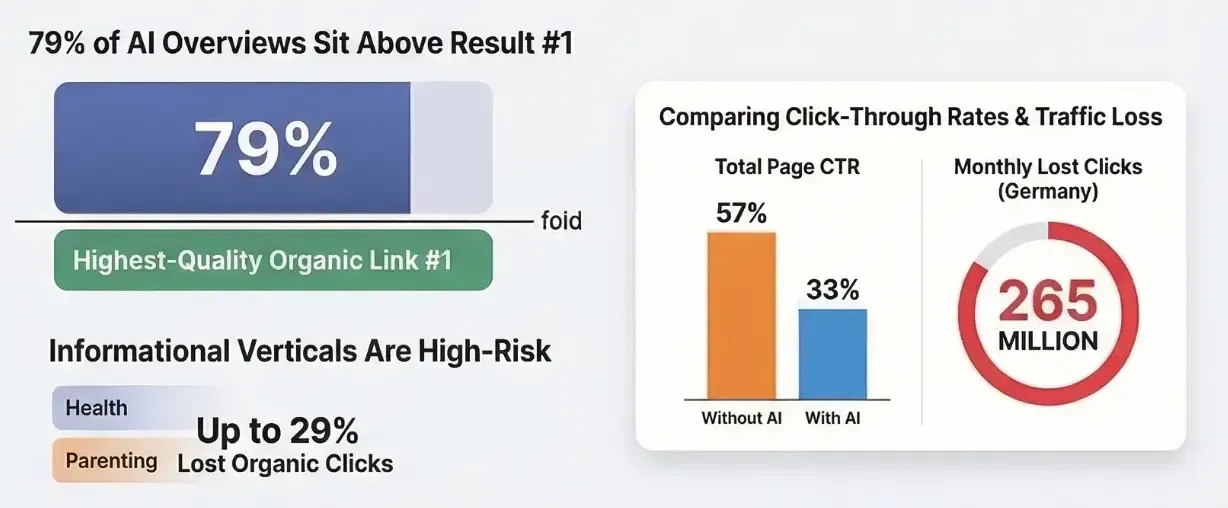
Google, the AI Race and the Organic Traffic Price

By Gerry White • July 28, 2025
Short answer, no
Buzz word bingo
By Gerry White • July 28, 2025
When we keep changing what we call ourselves, we're essentially telling the world that our previous work was wrong or outdated. That's nonsense. The technical SEO work I did ten years ago is still serving websites well today. The content strategies that worked in 2015 are still driving traffic and conversions.
By Gerry White • July 27, 2025
This is a subtitle for your new post